Find your exam or certification
Board exams, civil service, NMAT, bar, entrance tests, school subjects, IT certifications and job interviews. Take a mock exam right in your browser.
Turn your reviewers into mock exams.
Upload your reviewers, notes, past exams or photos of handouts. Learner Kit writes board-style multiple-choice questions with clear explanations and memory tips, then lets you practice with timed mock exams.
Latest version · Android 7.0 or later · APK or Google Play
- ✓No sign-up needed
- ✓Answers checked against reputable sources
- ✓Chats end-to-end encrypted
BETA access is open
Be one of the first to try what's next.
- 🃏Flash card decks
- 👥Study groups
- 📝Group mock exams
- ⚡New features first
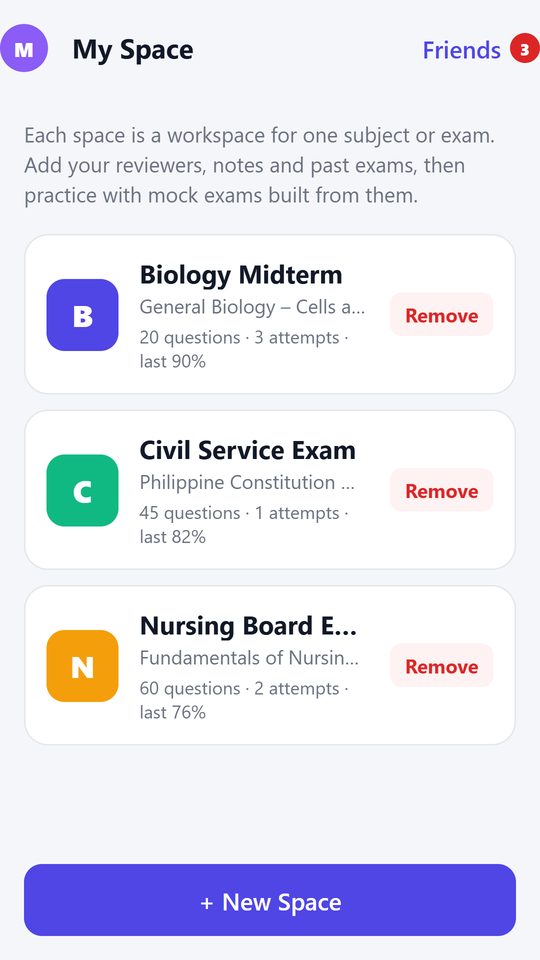
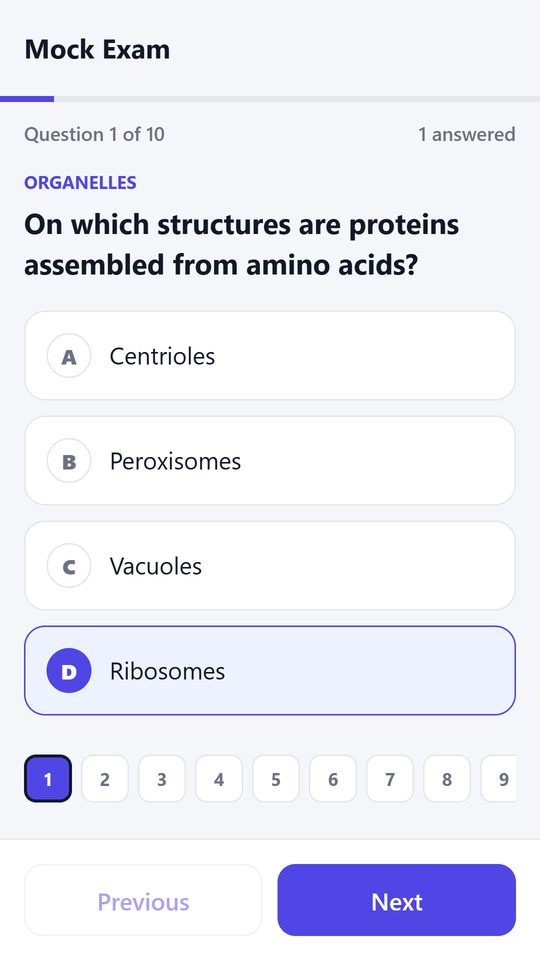
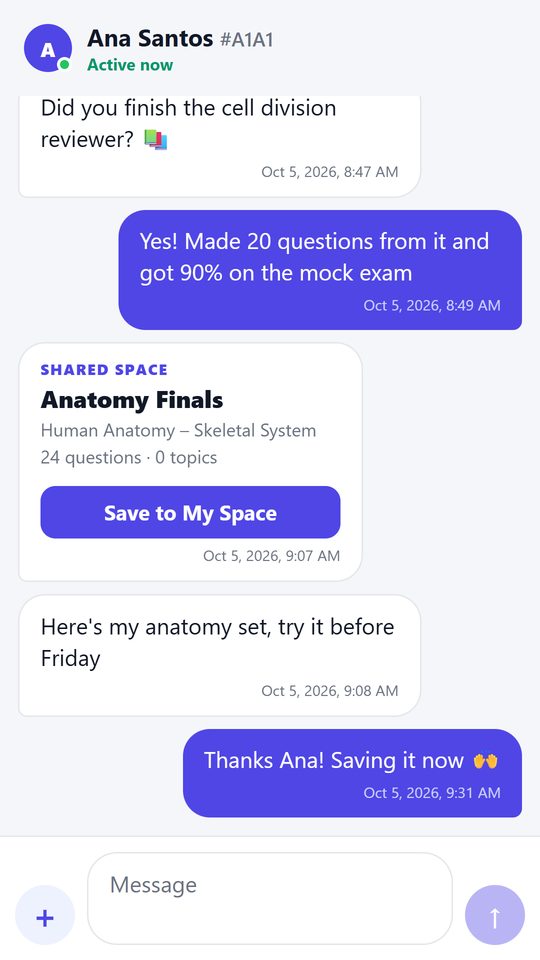
From handouts to a full mock exam in minutes
Make one space per subject or exam. Everything you need to review lives there.
Create a space
"Civil Service Exam", "Anatomy Finals", "Board Exam Math". One workspace per subject.
Add materials or topics
Upload PDFs and photos of your reviewers, or just outline the topics you need to cover.
Practice and review
Take timed mock exams, then see every answer with an explanation, a memory tip and its source.
Everything you need to pass
Built for licensure, board and certification exams, and just as good for your next quiz.
Board-style questions
Four choices, one right answer, written to licensure standard and focused on what's most examined.
Explanations & memory tips
Plain-language explanations, why each wrong choice is wrong, and a one-line tip to make it stick.
Checked answers
Answer keys are checked against reputable sources, with links you can open yourself.
Timed mock exams
Pick 5, 10, 20, 50 or all questions. Every attempt is saved so you can watch your score climb.
Study with friends
Add friends by QR code, chat, and share whole spaces of questions. See who's active right now.
Private by design
No account. Your materials, questions and scores stay on your phone, and chats are end-to-end encrypted.
Download rCenter - Learner Kit for Android
Free during the beta. Download the APK and install it right away (Wi-Fi is best, it's a big download), or ask to join the Google Play beta.
Latest version
- 1Tap Install the app on your Android phone and choose APK (downloads now) or Google Play (we add you as a tester).
- 2APK: open the downloaded file. If asked, turn on Allow from this source, then tap Install.
- 3If Google Play Protect says “Unsafe app blocked”: tap More details, then Install anyway. Don't tap OK.
- 4Tap Open and create your profile. See every screen ↓
Install the APK in 7 taps
Android shows a few safety screens for apps that don't come from Google Play. This is what they look like and exactly what to tap. (Drawings. Wording and colours vary a little by phone.)
You must tap More details then Install anyway
Google Play Protect warns about apps it hasn't seen on Google Play. Learner Kit isn't on Google Play yet, so you'll probably see “Unsafe app blocked” (or “Blocked by Play Protect”). The warning doesn't mean it found anything wrong with the app.
Tapping OK or Got it cancels the install. If that happens, open the file again and tap More details → Install anyway. The app comes straight from this website, and you can remove it any time.
-
1
Download: tap “Download anyway”
🔒 …/?get=apk⚠File might be harmfulDo you want to download Learner-Kit.apk anyway?CancelDownload anywayChrome may warn about any APK file. Tap Download anyway. No warning? Good, it's already downloading.
-
2
Open the downloaded file
🔒 …/?get=apkLearner-Kit.apk downloadedOpenTap Open, or tap the download notification. Missed it? Open the Files app → Downloads.
-
3
“Install unknown apps”: tap Settings
🔒 …/?get=apkChromeFor your security, your phone currently isn't allowed to install unknown apps from this source. You can change this in Settings.CancelSettingsOnly the first time. Android asks before letting Chrome (or Files) install an app.
-
4
Turn on “Allow from this source”, then go back
←Install unknown appsChromeAllow from this sourceYour phone and personal data are more vulnerable to attack by unknown apps…Switch it on, then press Back ←. The install screen comes back.
-
5
Tap Install
 rCenter - Learner KitDo you want to install this app?CancelInstall
Updating? It says “Do you want to update this app?”. Tap Update.
-
🛡Unsafe app blockedPlay Protect doesn't recognise this app's developer. Apps from unknown developers can sometimes be unsafe.① More details˄Install this app only if you trust where it came from.Install anywayOK6
Play Protect warning: tap “Install anyway”
MUST DO · DON'T TAP OK- 1Tap More details to open the extra buttons
- 2Tap Install anyway
Your phone may show it differently: “Scan app” or “Install without scanning” (either is fine), or ask for your fingerprint or PIN to confirm “Install unsafe app?”. Confirm it. Afterwards Play Protect may ask to send the app for a security scan. You can say yes.
-
7
Done: tap Open
rCenter - Learner Kit✓ App installed.DoneOpenCreate your profile and start studying. The app is also on your home screen.
Stuck?
I tapped OK on the Play Protect warning by mistake
Nothing was installed. Open the file again (Files → Downloads, or Chrome ⋮ → Downloads), tap Install, then More details → Install anyway.
It says “App not installed”
- You got Learner Kit from Google Play: update it in Google Play instead. Google Play's copy and this APK are signed differently, so neither can install over the other. Switching means uninstalling first, which deletes your spaces, questions and scores on this phone. Only do that if you don't need them.
- An old test build is on your phone: same as above. Update it from where you installed it.
- Not enough storage: free up space (about twice the file size) and try again.
- The download was cut off: download it again, on Wi-Fi if you can.
There's no “Install anyway”: Play Protect blocks it completely
Open the Play Store → tap your profile picture → Play Protect → Settings ⚙ → turn off Scan apps with Play Protect. Install the APK, then turn it back on. Work and school phones may not allow this. Ask whoever manages the phone, or join through Google Play instead.
I can't find “Install unknown apps”
Open Settings and search for unknown apps. It's usually Settings → Apps → Special app access → Install unknown apps (on Samsung: Settings → Apps → ⋮ → Special access). Pick the app you opened the file with (Chrome or Files) and turn on Allow from this source.
How do I update to a new version later?
Update from where you installed it. Installed this APK? Download the new APK from this page and install it over the old one. Installed from Google Play? Update in Google Play. Don't uninstall first. Your spaces, questions and scores stay. The app also tells you where to update when a new version is needed.
Still not working?
Watch the how-to videos or contact us. Tell us your phone model and what the screen says.
Free for everyone, supported by short videos
Generating from topics is always free. During the beta, generating from uploaded materials asks you to watch three short videos first. They keep Learner Kit free for everyone.